








Revic AI
Scale your team with Revic AI's sales software: Quickly find, research, and engage top accounts to close deals faster than ever.
About
Revic helps enterprise revenue teams identify which accounts they can win, understand why, and take the next best action. It combines CRM and revenue history with account research, buying signals, and organizational knowledge to continuously prioritize accounts and guide execution.
The Revic integration brings this intelligence directly into Gong Engage. From the Revic AI tab on each Gong account page, sellers can review ICP fit, account research, signals, key stakeholders, recommended actions, and account plans without leaving Gong.
Media
Features

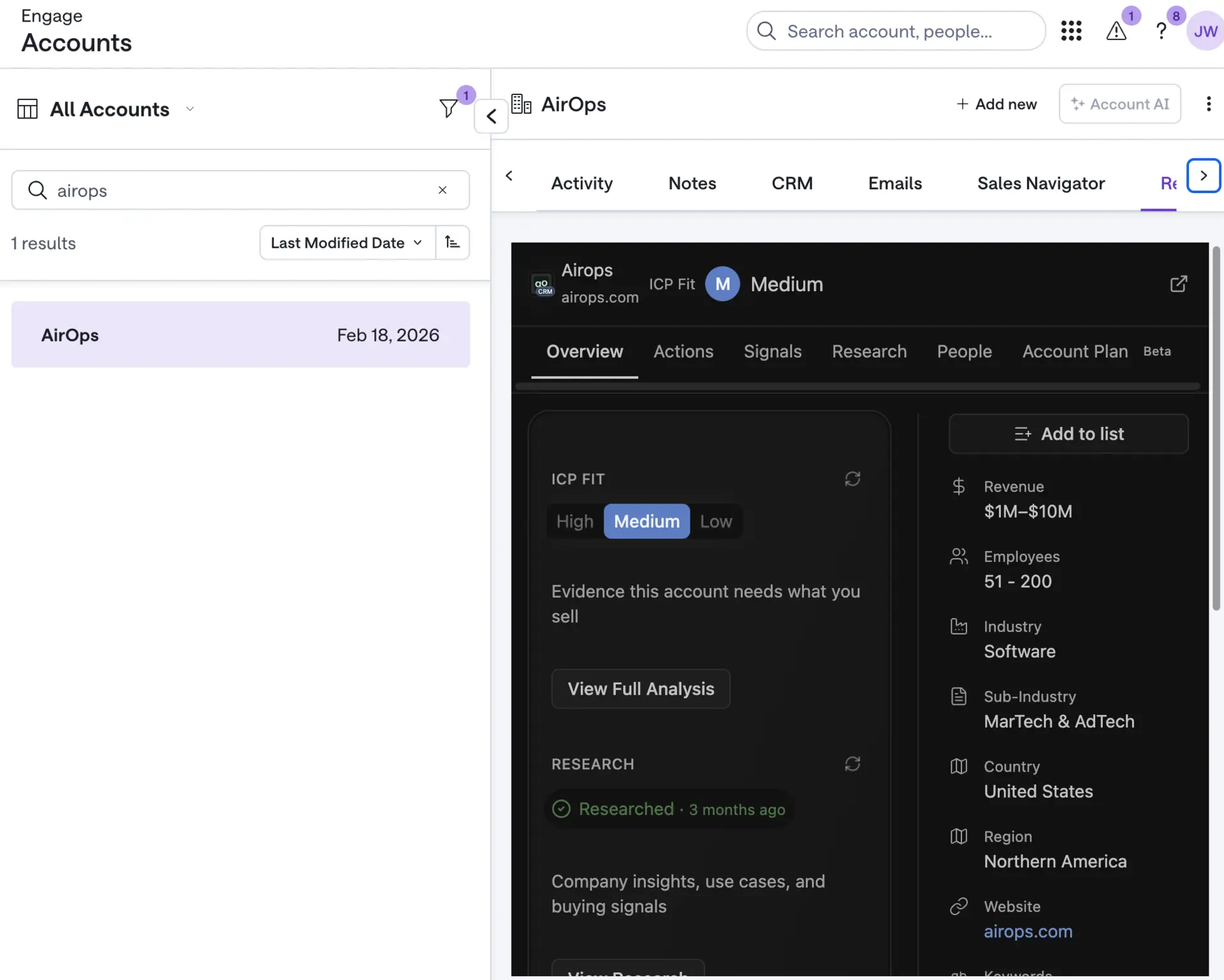
View Revic Account Intelligence in Gong
Open the Revic AI tab on any Gong Engage account page to see ICP fit, account research, buying signals, key stakeholders, recommended actions, and account plans for the account you’re viewing. Revic matches the Gong account to its corresponding CRM record, giving sellers actionable account intelligence without leaving Gong or searching across tools.
Benefits
Focus Sellers on Winnable Accounts
Help sellers understand which accounts best fit how your team wins, why they deserve attention, and where to focus next. Revic turns account and revenue context into clear, evidence-backed prioritization.
Act Without Leaving Gong
Give sellers the account context they need directly within Gong Engage. Reps can review research, signals, stakeholders, and account plans without switching tools or searching for the same account elsewhere.
Turn Account Intelligence Into Action
Move from insight to execution with recommended actions, stakeholder guidance, and account plans tied to the account already open in Gong. Sellers spend less time assembling context and more time advancing the right opportunities.
FAQ
You need:
- An active Revic AI subscription with the Gong integration enabled.
- A Gong Engage subscription and assigned Engage seats.
- A CRM account connected to Gong and synced with Revic.
- A Revic organization Admin or Super Admin to initiate setup.
- A Gong Technical Admin to approve the authorization.
No additional third-party subscription is required.
A Revic organization Admin or Super Admin must initiate the connection. A Gong Technical Admin must approve the application in Gong. These roles can belong to the same person or different people.
In Revic, open Organization Settings → Integrations, find Gong, and select Connect Gong. Complete the Gong authorization when prompted. Once approved, return to Revic and confirm that Gong shows as connected.
No. Administrator access is required only to connect or revoke the organization-level integration. Sales users need access to the connected Revic organization, access to Gong, and an assigned Gong Engage seat.
Open an account from the Accounts or Pipeline area in Gong Engage. Revic appears as an embedded account-information panel, allowing you to review Revic intelligence without leaving Gong.
The embedded experience can show the account overview, fit and prioritization information, recommended actions, signals, research, relevant people, and the account plan. Available information depends on the account’s data and your Revic access.
Gong does not pass your Revic identity to the embedded application. The first time you open Revic within Gong, you may need to sign in through a popup. Allow popups and complete the Revic sign-in to continue.
Revic could not find a matching account for the CRM identifier supplied by Gong. Confirm that the account exists in the CRM connected to Gong and has synced successfully with Revic. Once synchronization completes, refresh the Gong account page.
The embedded account experience is designed primarily for review. Actions that require editing data or completing a full workflow open the corresponding page in Revic. If your organization separately enables Gong Engage delivery, explicit user-approved actions may be sent to configured Gong flows.
No. Gong supplies the current account’s CRM identifier, and Revic uses it to display the matching account intelligence inside the embedded panel. The Revic account record remains in Revic.
Confirm that:
- You have access to both Gong and Revic.
- You have an assigned Gong Engage seat.
- Your organization has enabled the Revic integration.
- Your browser allows the Revic sign-in popup.
- The Gong account is synced to Revic through the connected CRM.
Refresh the account page after checking these items. If the problem continues, contact your Revic administrator or Revic Support.
Integration Diagrams
Revic displays account intelligence directly within the Gong Account page. Gong provides the account’s CRM identifier, which Revic securely resolves to the corresponding account in the authenticated user’s organization. Revic then presents relevant insights—including recommended actions, signals, research, people, and account plans—in a read-only embedded experience, helping sellers prepare and act without leaving Gong.
Data
Account
Account

Data
Account
Account
Requirements
Authenticating User Requirements
To authenticate this integration for the first time, the user must be a Gong Tech Admin and Revic AI organization admin or super admin.
Subscriptions Required
- Requires an active Revic AI subscription with the Gong integration enabled for the organization.
- Requires a Gong Engage subscription and an assigned Gong Engage seat for each user accessing Revic within Gong.
- No separate third-party subscription is required.
Connect
- Click Connect on this listing.
- Sign in to Revic with a Revic organization administrator account.
- When redirected to Gong, have a Gong Tech Admin review the requested permissions and click Allow.
- Return to Revic and confirm that the Gong connection is active.
- In Gong Engage, open Accounts and select the Revic AI tab on any account page. Individual users may be asked to sign in to Revic the first time they open the tab.
Once connected, Revic matches the account context from Gong with the corresponding CRM account and displays Revic account intelligence directly within Gong Engage.