




Trellus
Call from Trellus. Bring your recordings into Gong.
About
Trellus is a calling platform for sales teams. Reps make their calls in Trellus.
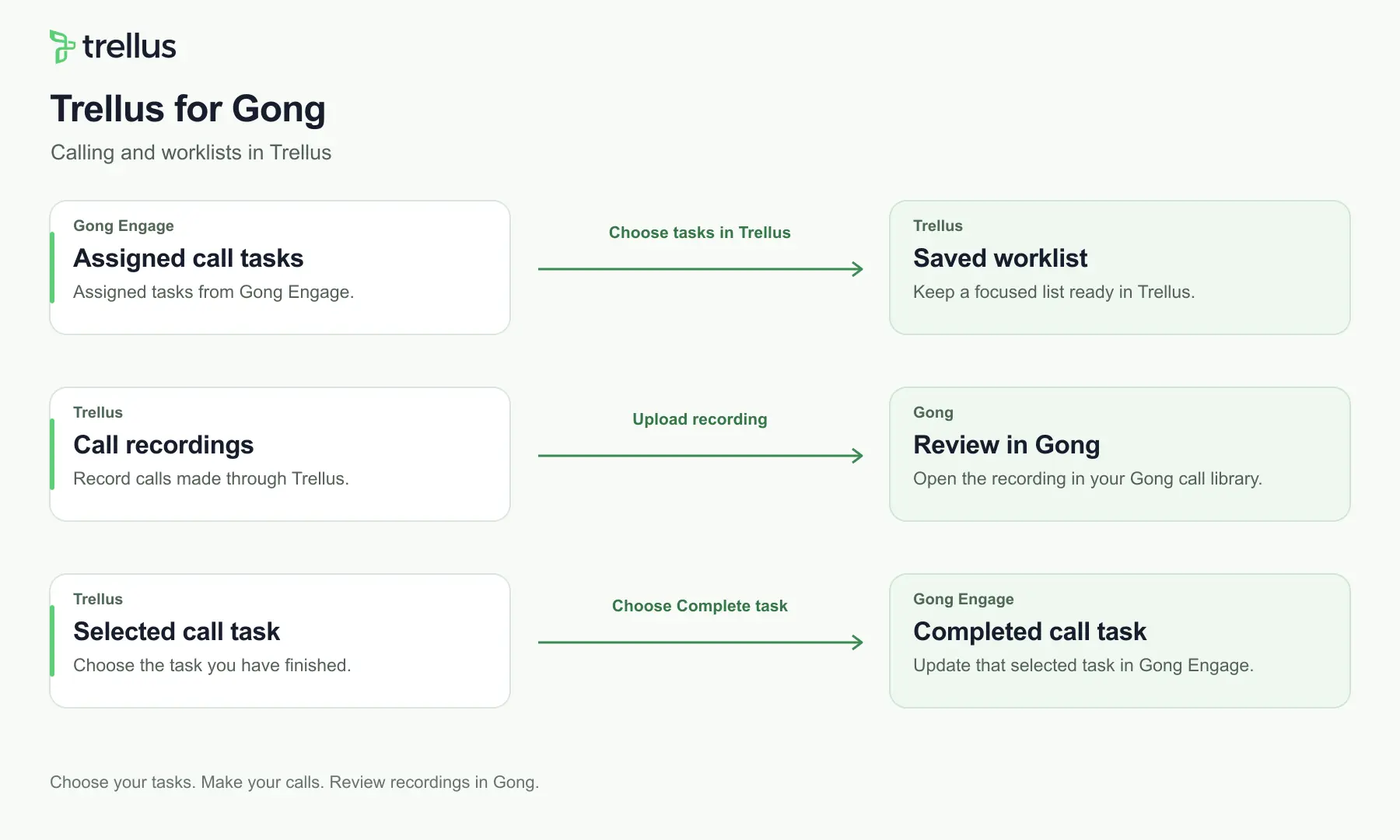
Reps make calls in Trellus, with assigned Gong Engage call tasks saved in a Trellus worklist. Eligible recordings upload to Gong, and reps mark selected tasks complete from Trellus.
Reps make calls in Trellus, with assigned Gong Engage call tasks saved in a Trellus worklist. Eligible recordings upload to Gong, and reps mark selected tasks complete from Trellus.
Media
Features
Import Trellus Calls
Once connected, eligible recordings upload as part of Trellus call logging. Your team can review them in Gong after processing.

Use Gong Data in Trellus
Open your assigned Gong Engage call tasks in Trellus and save them as a worklist. Choose Complete task in Trellus to mark a selected task done in Gong Engage.
Benefits

Engage tasks in Trellus
See your assigned call tasks and mark them complete from your Trellus worklist.
Recordings for review
Review uploaded Trellus recordings in Gong after processing.
FAQ
Gong controls recording processing and minimum-duration requirements. Uploading a recording does not guarantee it will be processed or available for playback.
In Trellus. Your worklist and task controls are in Trellus, while uploaded recordings are reviewed in Gong.
Gong Engage access is required for the task features. Recording uploads are a separate feature.
There is no extra Trellus integration fee. Your Trellus and Gong subscriptions still apply.
No. You choose Complete task separately after you have worked the task.
Integration Diagrams
Gong Engage supplies assigned call tasks. Reps make calls and manage their worklist in Trellus. Eligible recordings go to Gong for processing, and a rep’s confirmed completion updates the selected task in Gong Engage.
Data
Assigned Engage call tasks, task status and call recordings
Assigned Engage call tasks, task status and call recordings

Data
Trellus worklists, rep-confirmed task completion and eligible call recordings
Trellus worklists, rep-confirmed task completion and eligible call recordings
Requirements
Administrator access
A Trellus team admin connects their workspace. The Gong user approving access must have Tech Admin permissions. For Engage tasks, use the same work email in Trellus and Gong.
Trellus and Gong accounts
A Trellus account and Gong account are required. Gong Engage access is needed for task features. There is no extra Trellus integration fee.
Connect
A Trellus team admin connects their workspace. The Gong user approving access must have Tech Admin permissions. For Engage tasks, use the same work email in Trellus and Gong.
In Trellus, open Settings → Integrations → Gong and select Connect Gong.
Sign in to the Gong organization you want to connect. Review and approve the requested permissions as a Gong Tech Admin.
Return to Trellus and confirm the connection status.
Setup guide: https://app.trellus.ai/docs/gong/
In Trellus, open Settings → Integrations → Gong and select Connect Gong.
Sign in to the Gong organization you want to connect. Review and approve the requested permissions as a Gong Tech Admin.
Return to Trellus and confirm the connection status.
Setup guide: https://app.trellus.ai/docs/gong/